 AlgoVistra

On this page8 sections
Can ChatGPT trade? Not by itself, and it shouldn't. ChatGPT is a general-purpose chatbot. It is very good at explaining trading concepts, structuring a trading plan and reviewing a journal you paste into it. It is weak where real money is involved: it has no built-in feed of live candles, it can misread chart screenshots, it can state price levels that don't exist, and it doesn't hold your rules or your trade history unless you supply them every time. Use ChatGPT for trading as a tutor and an editor, not as a market reader or a signal source.
This guide covers what ChatGPT for trading does well, where it falls short, the risks, and how a trading-specific AI assistant is different. Product features change often, so treat the ChatGPT details as a snapshot from November 2026 and check OpenAI's own documentation for the current state.
What ChatGPT Is Good At for Traders
ChatGPT shines at jobs that are about language and reasoning rather than live market data.
1. Learning trading concepts
Ask it to explain market structure, liquidity, position sizing or the difference between a stop order and a limit order, at your level, with examples. You can keep asking "why?" until it clicks, which a static article can't do. Cross-check anything important with a second source, because a confident explanation can still be wrong.
2. Writing and tightening a trading plan
Describe how you trade in your own words and ask ChatGPT to turn it into a clear plan: markets, sessions, setups, entry conditions, risk per trade, a daily loss limit and the rules for when you stop. It is good at spotting gaps such as "what do you do after two losses in a row?". The plan is yours; ChatGPT only helps you write it down. For a step-by-step version, see from journal to trading plan.
3. Reviewing a journal you paste
Export your last 30 trades as text or CSV, paste them in and ask for patterns: results by setup, by session, after a loss, by day of the week. ChatGPT is good at summarizing a table you give it. It can only see what you paste, though, so a missing column (fees, initial risk, a tag) becomes a missing conclusion.
4. Spreadsheet formulas and simple scripts
Need a formula for win rate, average R or profit factor? ChatGPT writes spreadsheet formulas and small scripts quickly. Check the output on a few rows you can verify by hand before you trust the totals. Our guide to trading metrics to track lists the formulas worth having.
5. A second opinion on your reasoning
Write out why you like a setup and ask ChatGPT to argue the other side: what would make the idea wrong, which events could interfere, what you might be ignoring. This "devil's advocate" use keeps the decision with you and uses the model for what it does best, which is pointing at gaps in an argument.
Where ChatGPT Falls Short
The weaknesses all come from the same place: ChatGPT is not connected to your market data, your charting platform or your trading records.
No built-in live candles
ChatGPT's knowledge has a cutoff, and it has no direct price feed. Some versions can search the web, but a web search returns pages and headlines, not a clean series of candles across timeframes. When you ask "what is EUR/USD doing right now?", you either get a general answer or a summary of whatever pages it found, which may already be stale.
Chart screenshots are hard to read precisely
You can upload a chart screenshot, and ChatGPT will describe the trend and obvious swings. It can't reliably read exact prices from the axis, it only sees the bars that fit in the image, and it can't look at another timeframe. A described level is an estimate from pixels, not a value from data.
Levels can be invented
Large language models produce text that sounds right. Asked for "key support levels on gold", a chatbot without data may produce round, plausible numbers. They look precise and are not grounded in any chart. This is the most dangerous failure for traders, because a wrong level often comes in a confident tone.
It doesn't know your rules unless you repeat them
ChatGPT has a memory feature, and you can write custom instructions. That helps it remember facts about you, but it is not a rulebook that every answer is checked against. If your plan says "no trades in the 30 minutes before high-impact news" or "maximum 1% risk per trade", nothing guarantees the answer applies it unless you put it in the prompt.
It can't see your journal
Unless you paste or upload your trades, ChatGPT knows nothing about how you actually trade: which setups work for you, when you break rules, how you react after a loss. General advice is fine for learning; it is weak for coaching.
No sense of your risk
It doesn't know your account size, your open positions or your risk limits. Any talk of size or risk is generic unless you provide the numbers. For sizing, use a dedicated position size calculator and your own rules.
Can ChatGPT Trade for You?
Out of the box, ChatGPT is a chat tool. It does not hold a connection to your broker and does not place orders for you. Some AI products can operate websites or call external tools, but letting a general-purpose chatbot act on a brokerage account is a risk most traders should not take: one misread instruction or a wrong number can turn into a real order.
The same goes for "ChatGPT trading bots" sold online. Many are a script that sends prices to a language model and acts on the reply. A model's text is not a tested trading system, and a strategy that sounds good in a chat window has not been tested on years of data or real costs. If you are weighing automation, read what AI trading is first; it explains how bots, signal services and assistants differ.
Risks to Keep in Mind
- Overconfidence. Fluent answers feel authoritative. Ask "what data is this based on?" and treat any number without a source as unverified.
- Leading questions. "Is this a great long setup?" invites agreement. Ask neutral questions or ask for the case against.
- Stale information. Training data has a cutoff and web results can be old. Check dates on anything time-sensitive, especially news and economic events.
- Privacy. Don't paste account numbers, login details or broker statements with personal data. Strip identifiers from a journal export before you share it.
- Not financial advice. ChatGPT, like any AI tool, gives general information. Decisions, sizing and risk stay with you.
ChatGPT Trading Prompts That Work
Good ChatGPT trading prompts give context and ask for reasoning, not predictions. A few that work well:
- "Explain a change of character in market structure to someone who knows what support and resistance are. Use one example and one common mistake."
- "Here is my trading plan. List the situations it doesn't cover and ask me one question about each."
- "Here are my last 30 trades as CSV. Group results by setup and by session, show the trade count beside every percentage, and say which conclusions are too small to trust."
- "Here is why I like this idea. Give me the strongest case against it and the events that could invalidate it."
Avoid prompts like "Where will Bitcoin be next week?" or "Give me a buy signal". They ask the model to predict, which it can't do, and they push it toward invented levels.
We cover prompting in depth, with templates for analysis, trade review and learning, in how to talk to an AI trading assistant.
ChatGPT vs a Trading-Specific AI Assistant
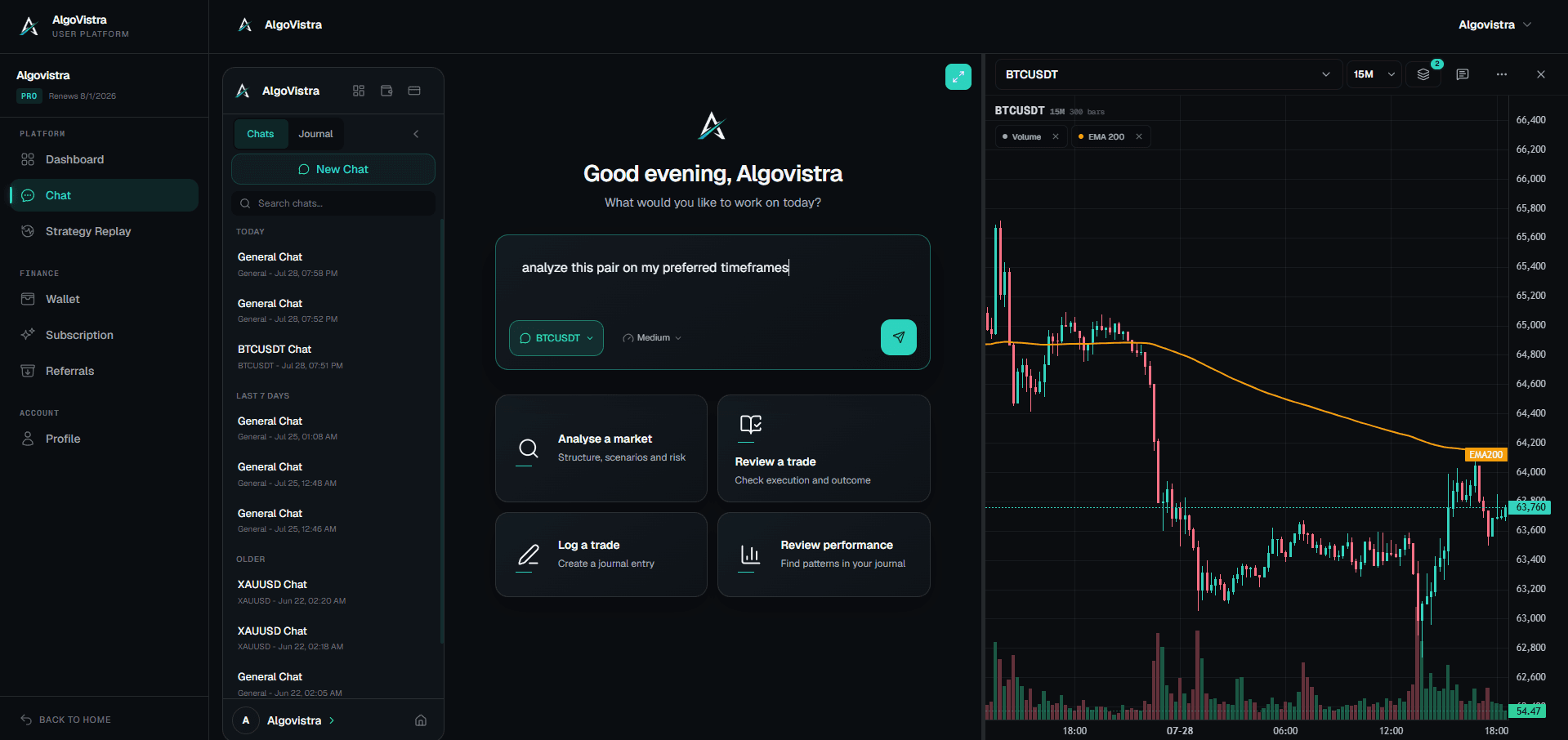
A trading-specific assistant uses a language model too, so it can also be wrong. The difference is what it is connected to. Here is how ChatGPT compares with AlgoVistra, as an example of a trading assistant:
| ChatGPT (general chatbot) | AlgoVistra (trading assistant) | |
|---|---|---|
| Market data | No built-in price feed; web search returns pages | Reads live candles across five timeframes, from daily to 5-minute |
| Charts | Describes an uploaded screenshot; exact prices are estimates | Analyzes the chart from data and draws its zones on your chart |
| Economic events and news | Only if it finds them in a search | Included in market analysis with the economic calendar and recent headlines |
| Your rules | Remembered loosely if you set memory or instructions | Your trader profile: markets, style, goals and hard rules, used in every answer |
| Your trade history | Only what you paste in | Your journal: trades you log or import from MetaTrader 5 or Binance |
| Trade execution | None by default | None. It never connects to your broker or places trades |
| Best for | Learning, writing, formulas, general reasoning | Reading your markets and reviewing your own trading |
Neither tool replaces your judgment. The point of a trading assistant is that its answers start from real market data and your own history, and say what they were based on, so you can check them. For a fuller explanation of the category, see what an AI trading assistant is.
A Sensible Way to Use Both
Many traders keep ChatGPT for general jobs and use a trading assistant for anything that touches the live market or their own results:
- Learn a concept with ChatGPT, or with any good explainer.
- Write your plan, then save the rules where your assistant can apply them.
- Analyze the market from real data, with scenarios and the conditions that would invalidate them, not a buy or sell call.
- Decide yourself, and size the position with a calculator and your risk limit.
- Journal the trade and review it later against your own rules.
The tool matters less than the habit: every answer should come with its evidence, and every decision should stay yours.
Frequently Asked Questions
Can ChatGPT trade stocks or forex for me?
No. ChatGPT does not connect to a broker or place orders by default, and it isn't a tested trading system. Even where AI tools can operate websites, handing execution to a general chatbot is risky. Use it to learn and to review your decisions instead.
Is ChatGPT good for trading?
It is good for learning concepts, structuring a trading plan, writing spreadsheet formulas and summarizing a journal you paste in. It is not reliable for reading live markets, exact chart levels or anything that depends on your own rules and history.
Can ChatGPT read trading charts?
It can describe an uploaded screenshot: trend direction, obvious swings, broad patterns. It cannot reliably read exact prices from the axis, see bars outside the image, or switch timeframes. Treat any level it gives from a screenshot as an estimate.
Can ChatGPT predict the stock market?
No. Language models generate likely text; they don't forecast prices. An answer that names a future price is a guess presented in a confident tone. Useful questions ask for scenarios, conditions and risks, not predictions.
What are good ChatGPT trading prompts?
Prompts that give context and ask for reasoning: explain a concept with an example, find gaps in your trading plan, group your pasted trades by setup with sample sizes, or argue against your idea. Our prompting guide has templates.
Is it safe to share my trading data with ChatGPT?
Share as little as you need. A journal export without account numbers or personal details is usually enough for a review. Never share login credentials or full broker statements, and check the provider's data settings before uploading files.
Disclaimer: AI tools, including ChatGPT and AI trading assistants, provide information for educational purposes only. Nothing here is financial advice. Trading carries a high risk of loss; do your own research and use proper risk management.


